How to Send Disappearing Messages on WhatsApp (And What They Actually Protect You From)
Some conversations don't need to exist forever. A shared password, a temporary address, a sensitive personal detail - information that's useful for a moment but creates unnecessary risk sitting in a chat thread indefinitely. WhatsApp's disappearing messages feature handles exactly that: messages that delete themselves automatically after a set period, without you having to remember to go back and clean things up.
Here's how to set it up, what it actually does, and - just as importantly - what it doesn't do.
Quick Answer (For Those in a Hurry)
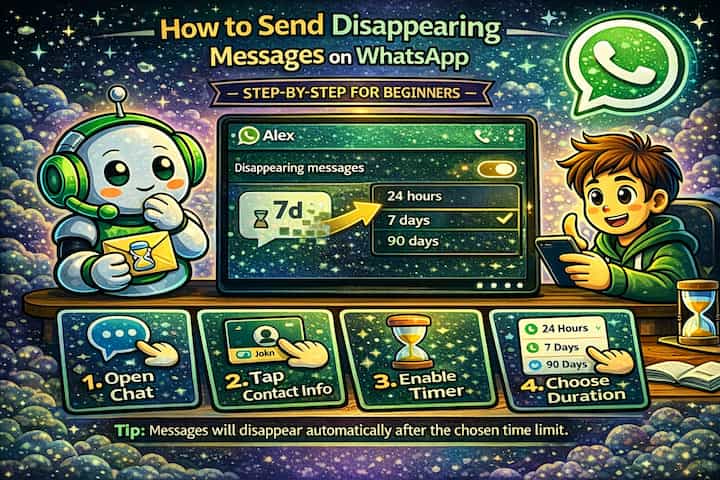
Open any WhatsApp chat, tap the contact or group name at the top to access chat settings, scroll to Disappearing Messages, and choose a duration - 24 hours, 7 days, or 90 days. Once enabled, all new messages in that conversation will automatically delete after the chosen period. The setting only affects new messages from that point forward, not anything already in the chat.
What This Guide Actually Helps You Do
This guide is designed for readers who want to change privacy or safety settings without misunderstanding what other people can still see. It adds value beyond the basic menu path by explaining which signals are hidden, which ones remain visible, and whether the change affects one conversation, one contact, or the whole account. That matters because privacy features are easy to overestimate, especially when screenshots, notifications, profile visibility, or group behavior still reveal context.
The practical goal is to leave you with a result you can verify, not just a menu path you followed. It also keeps the limits visible: this guide does not pretend to offer total invisibility, message secrecy against screenshots, or a way to bypass another person's privacy settings. It shows the reliable path, the trade-offs, and the checks that help you avoid repeating the same mistake.
Real Situations Where This Actually Helps
Disappearing messages solve a specific problem: information that has a natural expiration date but would otherwise sit in your chat history indefinitely.
You're sharing something sensitive that only needs to exist temporarily. A Wi-Fi password, a door code, a PIN, a one-time address. These things are useful for a day or a week, and after that they're just unnecessary data sitting in a conversation. If your phone is ever accessed by someone else, or if the other person's device is compromised, that information is still there. Disappearing messages remove it automatically without requiring either person to remember to clean it up.
You're having a conversation you'd prefer not to have permanently on record. Not because it's wrong - but because some discussions are meant to be in-the-moment. A candid personal conversation, a venting session with a close friend, a frank exchange about a work situation. These aren't things you want screenshotted or referenced six months later. Setting a 24-hour or 7-day timer means the conversation lives in the present rather than becoming a permanent archive.
You're in a group chat that accumulates a lot of noise and you want it to stay clean. Group chats in particular tend to fill up with short replies, reactions, and throwaway messages that nobody needs to read again. Enabling disappearing messages in a group - if you're an admin - means the chat stays current without requiring anyone to periodically go through and manually delete threads.
Before You Enable It: One Thing to Know
Disappearing messages only affect new messages sent after the feature is turned on. Everything already in the conversation when you enable it stays exactly where it is. If you want to clean up existing messages, you'll need to delete them manually - the timer doesn't retroactively apply. This is one of the most common misunderstandings about how the feature works.
Also worth knowing: both people in the conversation are notified when disappearing messages are turned on or off. It's not a silent setting.
How to Enable Disappearing Messages - Step by Step
Step 1 - Open the Chat
Open WhatsApp and navigate to the conversation - individual or group - where you want to enable disappearing messages.
Step 2 - Tap the Contact or Group Name
At the top of the chat, tap the contact's name (for individual chats) or the group name (for group chats) to open the chat info screen.
Step 3 - Find and Tap Disappearing Messages
Scroll down the chat info screen until you see Disappearing Messages and tap it.
Step 4 - Choose Your Duration
Select how long you want messages to remain visible before they're automatically deleted. WhatsApp offers three options: 24 hours, 7 days, and 90 days. Choose based on how sensitive the content is and how long it genuinely needs to be accessible.
Step 5 - Start the Conversation
Tap back into the chat. A small timer icon will appear next to new messages, confirming the feature is active. All new messages in this conversation will now automatically delete after the duration you selected.
What Changes After You Enable This
Once disappearing messages are on, every new message sent in the chat gets a silent countdown timer attached to it. When that timer expires, the message is gone from both sides of the conversation - your device and the recipient's. Neither person needs to do anything. You won't see a notification when a specific message disappears, it simply stops being there.
The chat thread itself remains. The contact, the conversation, any media that was saved to the camera roll before deletion - those persist. What disappears is the message content itself within WhatsApp. Media sent in a disappearing messages chat will also delete from the chat, but if the recipient saved it to their phone's gallery before it expired, that copy remains on their device.
If you're an admin of a group chat, you can enable disappearing messages for the entire group and set the default duration. Individual members can't override this setting unless they're also admins.
Advanced Tips: Getting More Out of the Feature
Disappearing messages work well as a basic privacy layer, but there are a few ways to use them more deliberately.
Set different durations based on the sensitivity of the content. The 24-hour option is best for truly transient information - codes, temporary plans, one-time details. The 7-day window works well for ongoing conversations where you want a natural rolling cleanup. The 90-day option is more about decluttering than privacy - it keeps the chat from growing indefinitely without the urgency of short-term deletion. Matching the duration to the actual sensitivity of the conversation makes the feature meaningfully more useful.
Enable it by default for all new chats through Default Message Timer. WhatsApp lets you set a global default so that disappearing messages are automatically activated for every new conversation you start. Go to Settings -> Privacy -> Default Message Timer and choose your preferred duration. This is particularly useful if you generally prefer not to accumulate permanent message histories and don't want to enable it manually each time.
Use disappearing messages alongside disabled read receipts for maximum privacy in sensitive chats. Disappearing messages remove the content after a set time, but they don't hide the fact that messages were exchanged. If you also disable read receipts (Settings -> Privacy -> Read Receipts), the other person won't see when you've read their messages - which, combined with disappearing content, significantly reduces the amount of information being permanently recorded on either side.
In groups, use it to enforce a clean-chat policy without relying on members to delete manually. If you manage a work group, a planning chat, or any group where information has a natural shelf life, enabling disappearing messages as the admin creates a self-cleaning environment. Members don't need to remember to delete anything - the chat stays current automatically. Pair it with a 7-day or 90-day timer to give people enough time to act on information before it expires.
What Disappearing Messages Can't Do
The feature reduces exposure - it doesn't eliminate it. The most important limitation is one that WhatsApp itself is transparent about: anyone can take a screenshot before a message disappears, and that screenshot lives outside WhatsApp entirely. There's no technical mechanism that prevents it. If you're sharing something with someone you don't fully trust, disappearing messages add friction but not a guarantee.
WhatsApp does include a "View Once" feature for photos and videos - separate from disappearing messages - that prevents screenshots on most devices and only allows the content to be opened one time. For visual content that's genuinely sensitive, View Once is a stronger option than the standard disappearing messages timer.
There's also the matter of forwarding. Before a message expires, it can be forwarded to another chat where disappearing messages aren't enabled - and it will live there permanently. The timer governs the original conversation, not any copies that were made while the message existed.
Finally, disappearing messages don't affect WhatsApp backups that were made before the deletion occurred. If someone's chat was backed up to Google Drive or iCloud before the timer ran out, that backup may contain the message. This is a narrow edge case, but worth knowing if the stakes are genuinely high.
Frequently Asked Questions
If I turn off disappearing messages mid-conversation, do messages already sent with a timer still delete? Yes. Once a message is sent with disappearing messages enabled, its timer is already running. Turning off the feature afterward doesn't cancel timers on messages that were already sent - those will still delete when their countdown expires. Disabling the feature only means that new messages from that point forward won't have a timer attached.
Can the other person in a 1-on-1 chat turn off disappearing messages without my knowledge? Yes, if they're not the one who enabled it, they can turn it off. WhatsApp notifies both participants when the setting changes, so you'd see a system message in the chat indicating that disappearing messages were disabled. You can re-enable it, but you can't prevent the other person from turning it off - it's a shared setting in individual chats.
Does enabling disappearing messages delete media I've already saved to my phone? No. Media that was saved to your camera roll or device storage before the message expired is unaffected. Disappearing messages only remove content from within WhatsApp - anything already saved to your device stays there. The same applies to the recipient: if they saved a photo or video before the timer ran out, that copy persists on their phone.
Does the timer pause if the recipient hasn't opened WhatsApp yet? No. The timer starts counting from when the message is sent, not when it's read. If someone is offline for two days and you sent a message with a 24-hour timer, that message will already be gone by the time they open the chat. This is worth keeping in mind for time-sensitive information - if the recipient needs to act on it, make sure the timer is long enough for them to actually see it.
Can I use disappearing messages in broadcast lists? No. Broadcast lists in WhatsApp don't support disappearing messages. The feature is available for individual one-on-one chats and group chats, but not for broadcasts. If you need temporary messaging for a broadcast-style situation, your options are limited to sending individual messages with disappearing messages enabled in each separate chat.
What To Verify Before You Finish
A good finish looks like this: the privacy behavior is clear in a real conversation and you know what the other person will still be able to notice. Before moving on, do a small real-world test: try the setting with a trusted contact or secondary device, then compare the visible profile, notification, or message state from both sides.
If someone can still see something you expected to hide, the most likely explanation is that the feature protects only a specific layer of privacy and does not control screenshots, saved media, group history, forwarded content, or old notifications. In that case, use the troubleshooting or limitation section above first, because repeating the same taps usually hides the real cause.
Related Guides
Read next: Schedule messages on WhatsApp | Delete WhatsApp messages for everyone | Recover deleted messages on WhatsApp
Final Thoughts
Disappearing messages are most useful when you treat them as a cleanup tool rather than a security guarantee. They're excellent at keeping conversations from accumulating data that nobody needs long-term, and they're genuinely helpful for information with a natural expiration date. Just go in knowing what they can and can't do - and for anything truly sensitive, pair them with View Once and disabled read receipts for a more complete approach.