How to Create Discord Channels (And Structure Them So Your Server Doesn't Turn Into a Mess)
Channels are where Discord servers either work or fall apart. A well-structured server with the right channels feels intuitive - members know where to post, conversations stay organized, and new people can figure out the space within thirty seconds. A server with poorly named channels, too many categories, or random clutter does the opposite. People post in the wrong place, important discussions get buried, and the whole thing gradually becomes a space nobody wants to spend time in.
Creating a channel takes ten seconds. Thinking about whether you actually need it takes ten more - and those ten seconds are what separate a server that works from one that doesn't.
Quick Answer (For Those in a Hurry)
Click your server name at the top of the left sidebar, select Create Channel, choose between a text or voice channel, give it a name, set permissions if needed, and click Create Channel. To keep things organized, right-click any existing category and select Create Channel to add the new channel directly inside that category instead of dropping it loose at the bottom of the list.
What This Guide Actually Helps You Do
This guide is designed for readers who want to set up a channel, group, or community space that works for real people after the first day. It adds value beyond the basic menu path by explaining who should be able to join, who can post, what permissions members need, and how moderation will stay manageable. That matters because new communities often fail because the setup looks finished but roles, invites, rules, and posting permissions are unclear.
The practical goal is to leave you with a result you can verify, not just a menu path you followed. It also keeps the limits visible: this guide does not pretend to offer instant growth, automatic engagement, or a community that moderates itself without clear structure. It shows the reliable path, the trade-offs, and the checks that help you avoid repeating the same mistake.
Real Situations Where Channel Structure Actually Matters
Channel organization sounds like an administrative detail - until you're in a server where it's clearly been done wrong.
You're running a growing community and new members keep posting in the wrong channels. They put questions in the announcements channel, post memes in the support channel, and have general conversations in the introductions channel. This isn't their fault - it's a structure problem. When channel names and categories aren't immediately clear, members default to posting wherever feels closest. A well-named channel with a short description in the topic field solves this without requiring any moderation.
You're using Discord for a team or project and want different workstreams to stay separated. Everything landing in one #general channel means critical project discussions scroll past casual chat and no one can find what they need later. Separate channels for each workstream - #planning, #feedback, #resources, #daily-updates - let people contribute to what's relevant to them and find information without scrolling through noise. The search function helps, but clean channel structure prevents the need to search in the first place.
You want to give different members access to different parts of the server without it feeling overly complicated. Maybe some channels are for verified members only, some are for staff, some are open to everyone. Discord's private channel feature handles this cleanly - but only if you've thought through which channels should be gated and which should be open when you create them. Retrofitting privacy settings onto an existing channel structure is significantly messier than building them in from the start.
Before You Create Anything: One Thing to Know
Discord has no undo button for deleting channels, and deleted channels take their entire message history with them permanently. Before you create, rename, or restructure channels, think ahead. If a channel might serve a different purpose as your server evolves, a broader name ages better than a narrow one. And if you're unsure whether a channel is needed at all, don't create it yet - an empty channel looks worse than no channel.
The same logic applies to categories. Creating a category before you have at least two or three channels to put in it usually results in a single-channel category that looks odd and takes up vertical space for no reason.
How to Create Discord Channels - Step by Step
Step 1 - Open Your Server and Click the Server Name
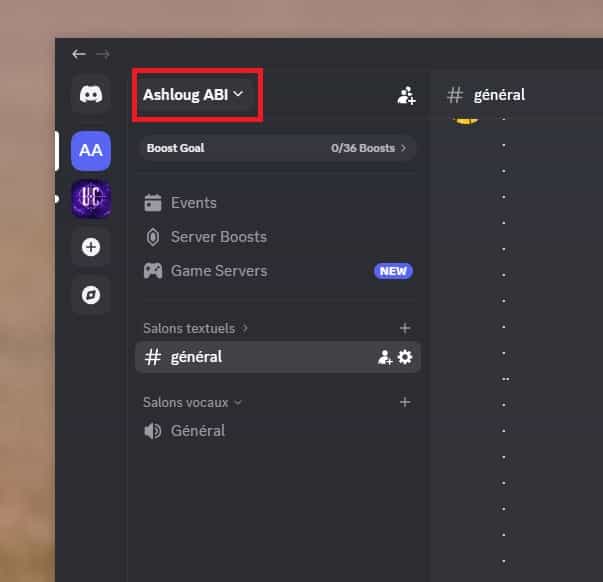
Open Discord and navigate to the server where you want to create a channel. Click on the server name at the very top of the left sidebar to open the dropdown menu.
Step 2 - Select "Create Channel"
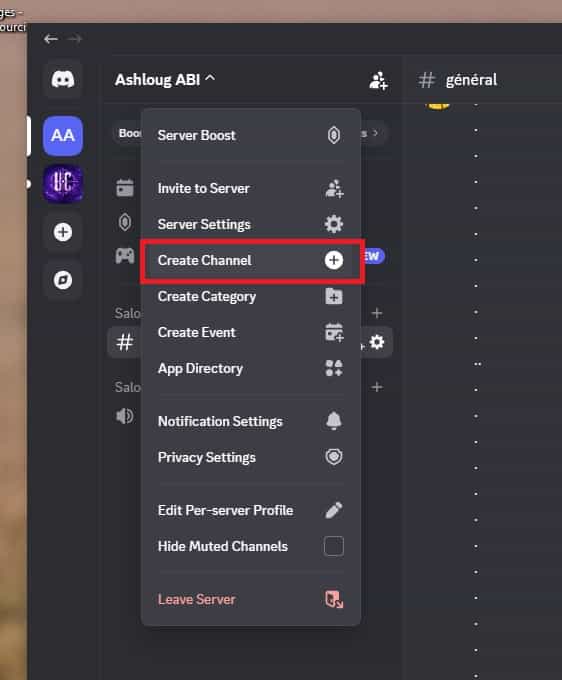
In the dropdown menu, click Create Channel. Alternatively, hover over any existing category name and click the + icon that appears to the right of it - this creates the channel directly inside that category, which saves you the step of dragging it later.
Step 3 - Name the Channel
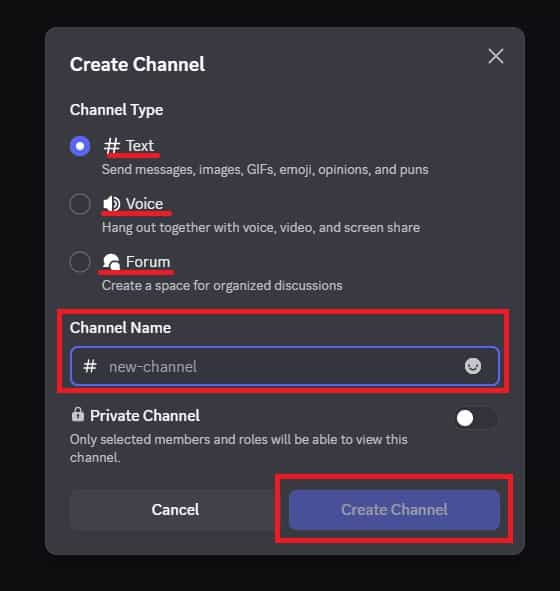
Type a name for the channel. Discord automatically formats text channel names in lowercase with hyphens replacing spaces - so "General Chat" becomes #general-chat. Keep names short, specific, and self-explanatory. A member who's never been in your server should be able to guess what the channel is for from the name alone.
Step 4 - Set Channel Permissions
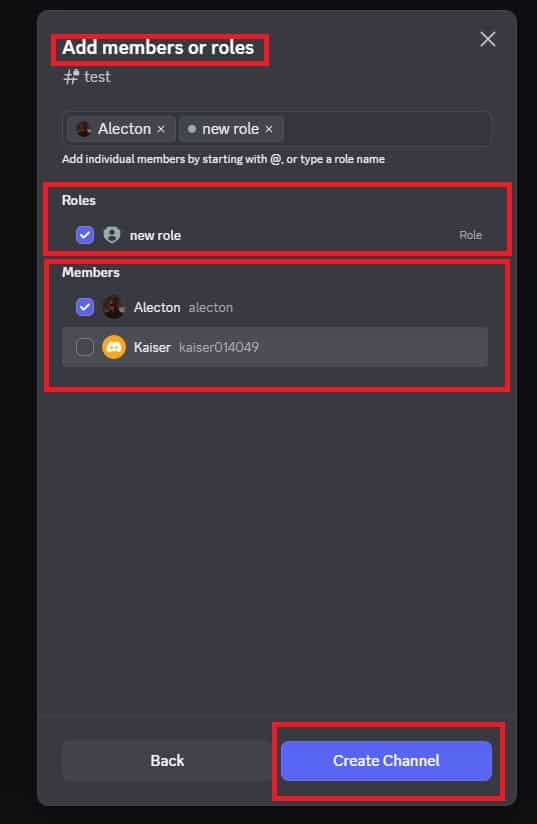
If this channel should be visible to everyone, leave the permissions at default. If it should be restricted to specific roles, toggle Private Channel on and select which roles can access it. Only members with those roles will see the channel - everyone else won't know it exists.
This is where most people make a mistake: they create the channel first and set permissions later, then wonder why everyone can see it. Set permissions during creation and it's done correctly from the start.
Step 5 - Edit the Channel After Creation
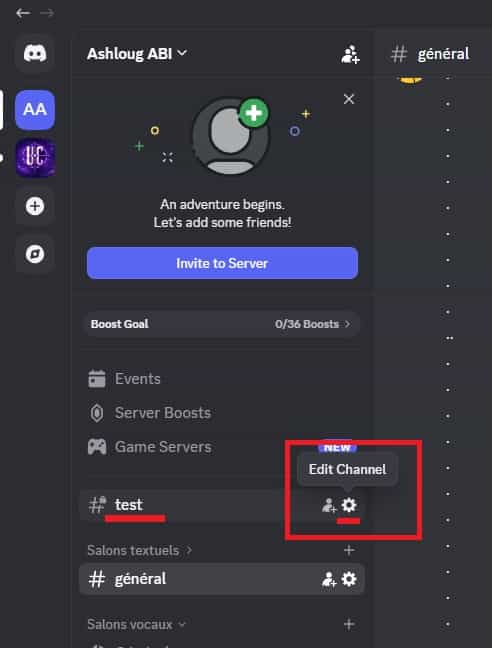
Once the channel is created, click the gear icon next to it to open channel settings. Add a Topic - a short description of what the channel is for that appears at the top of the channel when members open it. This single line of text reduces misuse more than any moderation rule because members know exactly what's expected before they type.
You can also set slowmode here (limiting how frequently members can post), which is useful for high-traffic channels like #general.
What Changes Once You Have a Proper Channel Structure
A server with well-organized channels behaves noticeably differently from one without. Members self-sort into the right channels because the names make the purpose obvious. Conversations stay on topic because each channel has a clear scope. Moderating becomes easier because off-topic posts have an obvious correct home - you can move or redirect them rather than just deleting them.
Categories are the multiplier. When channels are grouped into labeled sections - a "Community" section for welcome and rules, a "Discussion" section for topic channels, a "Voice" section for audio channels - members navigate the server vertically by section rather than scanning through every individual channel. This makes a 15-channel server feel manageable in a way that 15 channels in a flat list doesn't.
The channel topic field is underused and worth taking seriously. Members who open a channel see the topic at the top before they post. A topic like "Ask questions about the game here - no spoilers" sets expectations without requiring a pinned message or a rules post.
Advanced Tips: Channel Structure That Scales
Use categories as zones, not just labels. The most effective category structure divides the server into functional zones - one for information (read-only channels like announcements and rules), one for community interaction (general chat, introductions), one for topic-specific discussion, and one for voice. Members develop spatial memory for where things are, which means less confusion as the server grows and you add more channels within each zone.
Add a channel topic to every channel you create. Discord allows a 1,024-character topic for each channel, visible to all members at the top of the channel. Even a single sentence - "Weekly discussion thread, new topic every Monday" or "Share your work here - feedback welcome" - dramatically reduces off-topic posts. It also signals that the server is thoughtfully maintained, which affects how seriously members take the community.
Use slowmode on high-traffic channels to keep conversations readable. In a busy #general channel, messages can scroll past faster than anyone can respond to them, which paradoxically kills conversation quality. Setting a 10 or 30-second slowmode keeps messages spaced enough that each one gets read. Go to channel settings -> Slowmode and set an interval. For channels like announcements or rules, slowmode isn't needed - but for active chat channels it's one of the most underused tools in Discord.
Archive old channels by moving them to a collapsed "Archive" category rather than deleting them. When a project ends, an event finishes, or a channel becomes inactive, the instinct is to delete it. But the message history disappears with the channel. Instead, create an "Archive" category at the bottom of your server structure, move the channel there, restrict it to admin-only visibility, and collapse the category. The history is preserved, the channel is invisible to regular members, and your active server structure stays clean.
What Channel Creation Can't Fix
Channels organize conversations - they don't generate them. A server with twenty well-named channels and no active members feels emptier than a server with three channels that have real conversation happening. Channel structure is infrastructure, not engagement. Creating the right channels is a prerequisite for a healthy server, not a substitute for actually building a community.
Discord also has a channel limit of 500 per server, which sounds generous until you start creating topic-specific channels for everything. Most servers that hit engagement problems have too many channels rather than too few. Members scan the channel list, see nothing they feel like posting in, and leave without contributing. Fewer, more active channels are almost always better than many specialized ones that never get used.
Renaming channels after a community is established also carries social cost. Members develop habits around channel names and locations - renaming #general to #community-chat or reorganizing categories creates friction and disorientation, especially for frequent users. The right time to get naming right is when you create the channel, not after it's been active for months.
Frequently Asked Questions
Why can't some members see a channel I just created, even though it should be public? The most likely cause is that the channel was created with Private Channel enabled, or that it was created inside a category that has restrictive permissions. Discord inherits permissions from categories - if the category restricts certain roles from viewing channels inside it, new channels created in that category inherit those restrictions. Check the category's permissions first, then the individual channel's permissions, and verify that the roles in question aren't being explicitly denied access somewhere in that chain.
Can I reorder channels and categories after creating them? Yes. Click and drag any channel or category to reorder them in the sidebar. You can also drag a channel from one category to another this way. Discord saves the order automatically. There's no limit to how many times you can rearrange - the only consideration is that frequent structural changes can disorienting for established members who've learned where things are.
What's the difference between a private channel and a channel hidden by role permissions? They achieve the same result but through different mechanisms. The Private Channel toggle during creation is a shortcut that hides the channel from @everyone by default and lets you select which roles can access it. Setting role permissions manually in channel settings gives you more granular control - you can explicitly allow some roles, explicitly deny others, and set different permission levels (view only, send messages, manage messages, etc.) per role. For simple access control, Private Channel is faster. For complex permission structures, manual role permissions give you more precision.
If I delete a category, do the channels inside it get deleted too? No. Deleting a category removes the category header but moves all the channels inside it to the uncategorized section at the top of the channel list. The channels and their message history are preserved. This makes it safe to reorganize categories without worrying about losing content - only deleting the channel itself removes the messages.
Is there a way to duplicate a channel with all its settings instead of recreating it from scratch? Discord doesn't have a native channel duplication feature. The closest option is to manually create a new channel with the same settings - same name, same permissions, same topic. For servers with complex permission setups, this is tedious. Some bots offer channel cloning functionality if you need to duplicate multiple channels with identical configurations, but for most use cases, setting up a template role and permission structure once and applying it to new channels is the more practical approach.
What To Verify Before You Finish
A good finish looks like this: a new member can join, understand where to go, and interact only in the places you intended. Before moving on, do a small real-world test: enter the space from a normal member account or ask a trusted user to test joining, posting, reading, and leaving.
If members cannot access the right place, post in the wrong place, or get confused by the layout, the most likely explanation is that permissions, invite settings, channel visibility, role order, or the channel structure need to be adjusted before promotion. In that case, use the troubleshooting or limitation section above first, because repeating the same taps usually hides the real cause.
Related Guides
Read next: How to Make a Private Discord Server | Create Discord roles | Invite and verify users
Final Thoughts
Channel creation is one of those things where the technical part is trivial and the judgment part is what actually matters. The ten seconds it takes to think about whether a channel needs to exist, what it should be called, and who should see it pays off every day that the server is active. Build the structure for how you want the server to work, not for how you imagine it might work one day, and you'll spend a lot less time reorganizing later.